.png&w=3840&q=75)
Ecommerce A/B Testing: How to Test Your Store's Pop-ups (Without Fooling Yourself)
What to test on a sales or review pop-up, how to split shoppers fairly, and how to tell a real difference from luck, whatever your traffic.
Read summarized version with
 ChatGPT
 Claude
 Perplexity
 Grok
GrokAn A/B test is a simple idea. You show two versions of the same thing to two groups of shoppers at the same time, then keep the one that does better.
The setup is the easy part. Reading the result honestly is harder, and how long that takes depends on how many shoppers see your pop each day.
This guide sticks to one thing almost every Shopify store can test: the pop-up. A recent-sale notification, a review pop, a welcome message. You'll see what to test, how to run the test, how long to wait, and how to tell a real difference from a lucky week.
What ecommerce A/B testing actually is (and what it isn't)
In ecommerce A/B testing, version A is what you have today (the control). Version B is the same thing with one change. Shoppers are split between the two during the same period, and you compare how each version performs on a goal you picked in advance.
Two details carry all the weight:
- Same time. Both versions run side by side, so they see the same mix of shoppers, the same ads and the same day of the week.
- One change. If B has a different message and a different position, a better result can't tell you which change did it.
What it isn't: changing your pop on Monday and comparing this week with last week. That's a before-and-after comparison, and it mixes your change with everything else that moved. A payday, an email you sent, a holiday, a slow Tuesday. Before-and-after can give you a hint, but it can't separate your change from the calendar.
A/B testing is one habit inside a wider conversion rate optimization routine for Shopify stores. It works best when it answers a specific question you already have.
How to A/B test a pop-up, step by step
1. Start with something you've noticed
Good tests come from an observation, not from a list of ideas. "Shoppers close the pop within a second on mobile." "The pop shows up before anyone has scrolled." "Nobody clicks the review pop on collection pages."
Write it as a hypothesis: If I change X, I expect Y to change, and I'll measure it with Z. For example: if the sales pop waits until the shopper has scrolled, fewer people will close it straight away, measured by closes per view.
If the pop you want to test is a greeting, our guide to welcome pop-ups that greet customers well covers what that first message should do before you start changing it.
2. Change one thing
Duplicate the pop you have and change a single element: the wording, the position, the delay, the image. Everything else stays identical. Small, clear differences are easier to read than a full redesign, but the less traffic your pop gets, the bigger the change has to be to show up in the numbers (more on that below).
3. Decide what "better" means before you start
Pick one number to judge by and write it down before the test starts. Clicks per view, closes per view, or orders from shoppers who saw the pop. If you choose the metric after you've seen the results, you'll always find one where B looks good.
4. Show both versions at the same time
Each shopper should see one version and keep seeing that same version on return visits, so nobody gets both. Split the traffic evenly and run both versions over the same days.
5. Wait for enough data
Most bad decisions in A/B testing come from stopping early. Set a minimum length before you start (at least one full week, ideally two) and don't call the test before then, however good B looks on day three. The section on test length below shows why.
6. Keep one version and write down what you learned
When the test ends, keep the version that did better on the metric you chose. If neither did, keep the simpler one. Then write one line in a test log: what you changed, what you expected, what happened. After a few tests that log tells you more about your shoppers than any single result.
What to test on a social proof or sales pop-up
Each idea below is a question to test, not a promised result. Your store, your products and your shoppers decide the answer.
- Specific vs. general wording. If shoppers ignore "Someone just bought this," try a message with the product name and the city, and measure clicks per view.
- Position on the screen. If the pop covers the add-to-cart button on mobile, move it to the top or the opposite corner, and measure closes per view.
- Delay before it appears. If most closes happen in the first second, wait until the shopper has scrolled or spent a few seconds on the page, and measure closes per view.
- How often it shows. If returning shoppers see the same pop on every page, show it less often, and compare clicks per view along with orders.
- Type of pop. If recent-sale pops get few clicks on product pages, test a pop that shows a real review of that product instead. Here's more on how reviews can improve sales in your online store.
- With or without an offer. If a pop with a discount code gets clicks but few orders, test the same pop without the code, and judge by orders rather than clicks.
- Product image or no image. If the pop feels busy on small screens, test a text-only version, and measure clicks per view.
What not to test
Some "tests" shouldn't run at all. Don't test fake urgency, such as "Only 2 left!" when there are 40 in stock. Skip countdown timers that reset, or notifications about purchases that never happened. Even if they move a number for a week, they teach shoppers that your store's pop-ups can't be trusted, and that cost doesn't show up in the test. Social proof only works when it's true.
How long to run a test, and how your traffic changes the answer
A common question on store-owner forums is whether A/B testing even works when a store doesn't get much traffic. The honest answer is that it does. How long a test needs comes down to two things: how many shoppers see your pop each day, and how big a difference you're trying to spot.
A worked example (illustration, not a benchmark)
The numbers below are made up to show the math. They don't describe any real store.
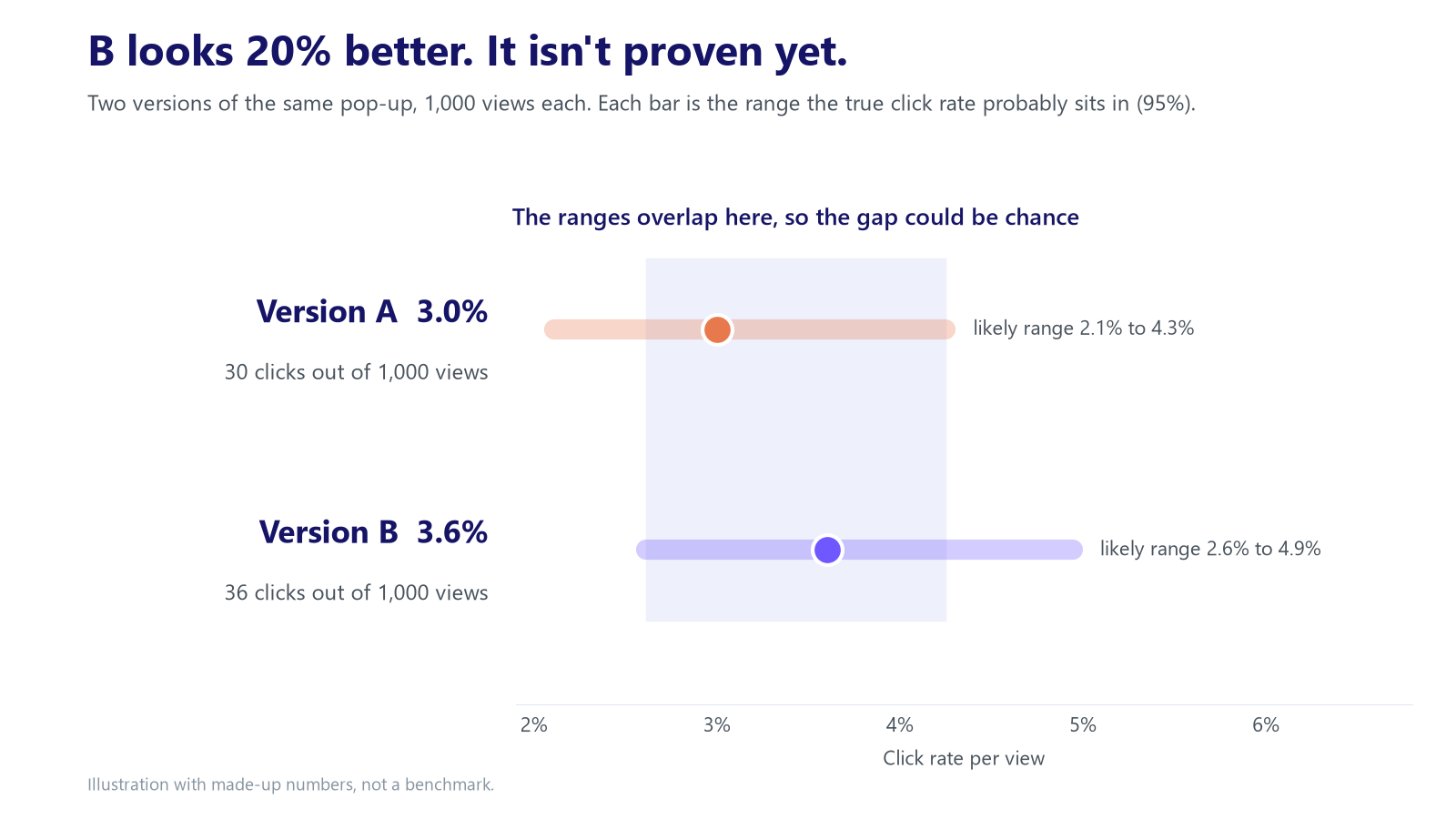
Say each version of your pop is seen 1,000 times. Version A gets 30 clicks (3.0%). Version B gets 36 clicks (3.6%). B looks 20% better.
It isn't proven. At this sample size, a gap of six clicks is well within what chance alone produces. Run the same two pops again next week and A could come out ahead.
How many views would you need? Using the standard sample-size formula for comparing two rates (95% confidence, 80% power):
- To reliably spot a move from 3.0% to 3.6%, you'd need roughly 14,000 views per version.
- To spot a move from 3.0% to 4.5%, you'd need about 2,500 views per version.
Then divide by your traffic. If your pop is seen 300 times a day, each version gets about 150 views a day. 2,500 views per version takes about 17 days, so plan for three full weeks. 14,000 per version would take about three months.
If your pop is seen 3,000 times a day, each version gets about 1,500 views a day. The same 2,500 views per version take about 2 days, but still run at least one full week (habit 1 below). 14,000 per version take about 9 days, so plan for two full weeks.
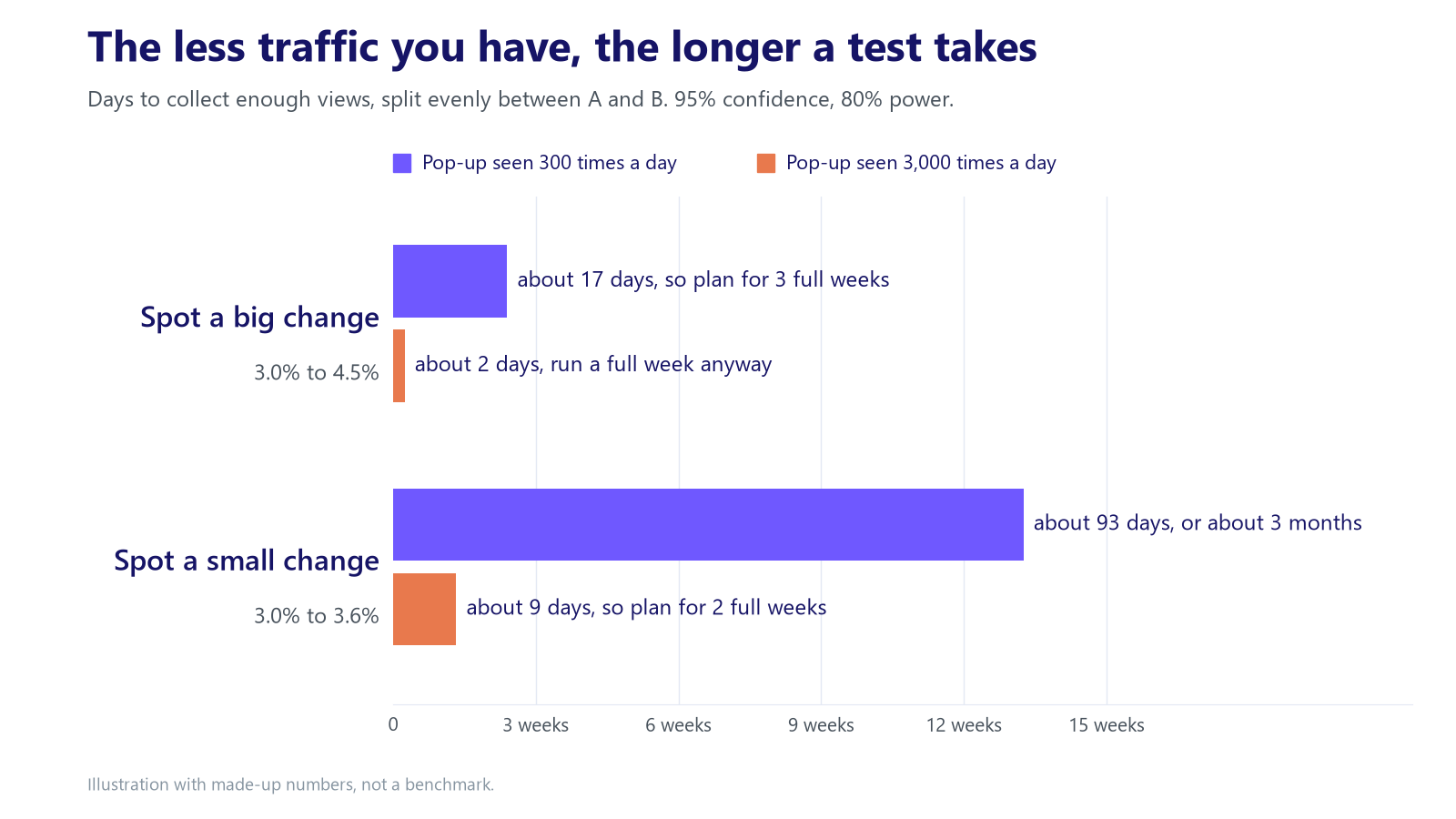
The lesson: the less traffic your pop gets, the bigger the change you test should be and the longer you wait. More traffic lets you spot smaller differences sooner, but never in less than a full week.
Four habits that keep any test honest
- Run full weeks. Weekends and weekdays shop differently. A test that runs Monday to Thursday has only seen part of your customers.
- Don't peek and stop. Results swing a lot in the first days. Stopping the moment B pulls ahead is the most common way to "find" a result that isn't real.
- Avoid big events. A sale, a product release or a holiday changes who visits. Start the test after the event, or run it all the way through and treat the result with care.
- Treat a tie as an answer. If the two versions end up close after enough views, the change didn't matter much to your shoppers. Keep the simpler version and test something bolder next.
FAQ
How much traffic do I need to A/B test a pop-up?
There's no single minimum. It depends on how big a difference you want to spot. In the example above, a move from 3.0% to 4.5% needs about 2,500 views per version, and a move from 3.0% to 3.6% needs about 14,000. With a few hundred pop views a day, small tweaks like a single word will rarely give you a clear answer, so test something bigger: a different position, a different delay or a different type of pop. With a few thousand views a day, smaller changes become testable in a couple of weeks.
Should I test more than one thing at once?
Not in a single A/B test. If version B changes the wording and the position, you won't know which one made the difference. Test one change, keep what works, then test the next.
What if the result is a tie?
A tie after enough views is useful. It tells you that change doesn't matter much to your shoppers. Keep the simpler version and spend your next test on something bolder.
SalesPop shows real sales and reviews from your store as small, calm pop-ups, so shoppers see what other people actually bought. It has 915 reviews and a 4.7-star rating on the Shopify App Store (as of October 2026).
Try SalesPop on your store, see how SalesPop works, or book a call if you'd rather talk it through first.